


| Hardware | |
|---|---|
| Components / other |
|
| Site Notice |
|---|
|
Nintendo Wiki has been upgraded! Please let site staff know if you see any errors. We also have a new domain: nintendowiki.net — please update links to use this new domain name. Thank you for editing! |
Nintendo Switch 2
Jump to navigation
Jump to search

|
This article is a stub. You can help NintendoWiki by expanding it. Reason: incomplete, needs expansion |
| Nintendo Switch 2 ニンテンドースイッチ2 Nintendō Suitchi Tsū | ||||||||||
| ||||||||||
| ||||||||||
| ||||||||||
| ||||||||||
| ||||||||||
|
The Nintendo Switch 2 is a ninth-generation hybrid video game console created by Nintendo that serves as the successor to the Nintendo Switch. It was first unveiled on January 16, 2025, and was released on June 5th, 2025.
Features
Just like the Nintendo Switch, the Nintendo Switch 2 is a hybrid console, which can be used as both a handheld console or a home console by placing it into a dock connected to a television or monitor. The unit is still similar in form factor to the Nintendo Switch consisting of the main body that includes the screen and primary hardware, and two Joy-Con 2 devices that can be attached to the main unit's sides in handheld mode, or can communicate wirelessly to the main unit when docked. [3] Along with the existing ports from the Nintendo Switch's design, which includes a USB-C port on the bottom serving as its power source and connector for a dock, a headphone jack, and a cartridge slot, the Nintendo Switch 2 includes a second USB-C port on the top of the unit. Unlike the original switch, the switch comes with a C-button below the home button and a microphone on the top edge.[4] Pressing the C-buttons opens up a menu which enables voice communication and sharing onscreen content with other users. The Switch 2 includes 256 GB of internal storage, an increase from the 32 GB of the original Switch.[5] In October 2026, a revision was released exclusively for PAL regions, along with various accessories. These revisions came with user-replaceable batteries in order to comply with European Union regulation.
Games
|
|
Main article: Category:Nintendo Switch 2 games |
Just like the Nintendo Switch, the Nintendo Switch 2 uses Game Cards. However, unlike the gray-colored cartridges the Nintendo Switch uses, the Nintendo Switch 2 cartridges are red in color, and they will have the Nintendo Switch 2 logo on them. Certain cartridges will have a small key icon at the top right, signifying that the cartridge is a game-key download cartridge.[6] The Nintendo Switch 2 is also backwards compatible with the majority of Nintendo Switch software in general, meaning that a Nintendo Switch cartridge can be played on a Nintendo Switch 2.[6]
In addition to native Nintendo Switch 2 games, Nintendo and some of their partners are also re-releasing a selection of Nintendo Switch software as Nintendo Switch 2 Edition titles, which include The Legend of Zelda: Breath of the Wild — Nintendo Switch 2 Edition and The Legend of Zelda: Tears of The Kingdom — Nintendo Switch 2 Edition at launch. These titles come with Upgrade Packs, enhancements and/or DLC that are only compatible on Nintendo Switch 2, but are cross-compatible with the Nintendo Switch both physically and digitally. Anyone who already owns a standard Nintendo Switch title that has a Nintendo Switch 2 Edition variant can purchase Upgrade Packs independently via Nintendo eShop.
- ↑ 1.0 1.1 1.2 Only released as a Game-Key Card in Japan, South Korean and China; internationally it is only available digitally
- ↑ Only released as a Game-Key Card/digitally in Japan exclusively
- ↑ Released as a digital only on June 5, 2026, but received a physical copy on August 7, 2026 in Japan only
Bundles
The Nintendo Switch 2 console can be bought on its own, featuring default packaging, which has the Joy-Con 2 attached to the Joy-Con 2 Grip, with the console docked behind. However, certain games are packaged along with the console, where the packaging changes to match that game. The first bundle is for the game Mario Kart World, which released on launch day: June 5, 2026. The packaging generally matched the default one, but with a banner for the game being located at the base, along with the age rating for the game and a notice saying a download code can be found inside. The second bundle is for Pokémon Legends: Z-A – Nintendo Switch 2 Edition, that released on October 16, 2025, where the bottom half of the packaging was replaced with a larger banner: the banner includes the two Pokémon trainer avatars, and some in-game screenshots, along with the age rating. On the side of the box, the three starter Pokémon can be found, replacing what would be an image of a person playing the Switch 2 in handheld mode. The third bundle is for Pokémon Pokopia, which released on July 2, 2026, and the banner for this bundle is nearly the entire box. The banner is a piece of artwork for the game, featuring numerous Pokémon, along with the Switch 2 console at the bottom right, with the age rating for the game at the bottom left. The side of the packaging is an entire Ditto, making it purple in color. The fourth bundle is for Nintendo Switch Sports Resort and a 3 month membership to Nintendo Switch Online, which is set to release on October 22, 2026. The box has artwork of the game at the center alongside its logo, with the notice for the includes Online subscription at the bottom right.
In The Legend of Zelda 40th Anniversary Direct, a new Nintendo Switch 2 bundle was announced, as well as accessories too, to coincide with the release of The Legend of Zelda: Ocarina of Time remake. This bundle includes a console, dock, and set of Joy-Con 2 with a Zelda-inspired theme, making it the first variant for the console, though it does not include the game.
Controllers and accessories
Joy-Con 2
|
|
Main article: Joy-Con 2 |
The Joy-Con 2 controllers are the primary controllers for the Nintendo Switch 2. Just like the Joy-Con for the Nintendo Switch, they can either be attached to the Nintendo Switch on either side of the system, detached from the system and held in each hand, or they can be attached to the Joy-Con grip or Joy-Con 2 straps. The Joy-Con 2 are an enhanced version of the Joy-Con for the Nintendo Switch; where each have an analog stick, four face buttons (the d-pad on Joy-Con 2 (L) and the standard face buttons on Joy-Con 2 (R), standard shoulder buttons and triggers, and a pair of "SL" and "SR" shoulder buttons on the rail. Joy-Con 2 (L) also features a Minus button and a Capture button, while Joy-Con 2 (R) has a Plus button, a Home button, and NFC functionality. However, on the Joy-Con 2 (R), an additional button can be found below the "home" button - the new C button, which allows for the new GameChat feature to be used[7] The Joy-Con 2 also feature mouse controls, which can be used in supported games.[7]
Presently, there are only 4 types of Joy-Con 2 controllers, the default ones, which are light blue (left) and light red (right) in color, the light purple (left) and light green (right) Joy-Con 2 controllers, which came with alongside the Mario Tennis Fever game.[8], the blue (left) and light yellow (right) ones, which were launched alongside Splatoon Raiders[9], and the final set are based on The Legend of Zelda. These Joy-Con 2 come included with The Legend of Zelda – 40th Anniversary Edition bundle, and they are set to release on October 29, 2026.
Joy-Con 2 Grip
The Joy-Con 2 Grip (BEE-009[10]) is an accessory for the Joy-Con 2 which allow for them to be held like a traditional controller. The regular grip comes together with the Nintendo Switch 2 console, but the Charging Grip variant (BEE-010[10]) does not and would need to be bought separately. Additionally, the Charging Grip comes with mappable "GL" and "GR" buttons, which the regular grip lacks.
Joy-Con 2 Strap
The Joy-Con 2 Straps (BEE-018[10]) are accessories for the Joy-Con 2. These accessories are wrist straps, which also allow for more stability when using mouse controls in compatible games. Presently, they only come in light blue and light red, and whilst each strap features a + or - symbol to align with the correct controller, then can be attached to either the Joy-Con 2 (L) or (R).[11]
Joy-Con 2 Wheel
The Joy-Con 2 Wheels (BEE-020[10]) are accessories for the Joy-Con 2, which allow for the Joy-Con to be interested and played like a racing wheel. These were released alongside at launch to go along with Mario Kart World. There are 2 wheels, one is light blue to go with the Joy-Con 2 (L), and the other is light red, to go with the Joy-Con 2 (R).[12]
Nintendo Switch 2 Pro Controller
|
|
Main article: Nintendo Switch 2 Pro Controller |
The Nintendo Switch 2 Pro Controller is an alternative controller to play the Nintendo Switch 2 with, with it heavily resembling its Nintendo Switch counterpart. It features the same buttons, with the exception of the brand new "C" button, which allows users to access the new GameChat feature.[7]
Aside from the basic Pro Controller, there only exists two special edition variants. The first is for the game Resident Evil Requiem, with it featuring printed news-clippings on the front of the controller from the game, and the second is for The Legend of Zelda: Ocarina of Time remake.
Nintendo GameCube Controller
|
|
Main article: Nintendo GameCube Controller (Nintendo Switch 2) |
The Nintendo GameCube Controller is a controller for the Nintendo Switch 2, meant to be used with the Nintendo GameCube - Nintendo Classics application to play ported Nintendo GameCube games, such as The Legend of Zelda: The Wind Waker and Luigi's Mansion. It is a near-replica of the original Nintendo GameCube Controller, but also having the Capture button and C-button. It released on June 5th, 2025, the same day the console released.
Nintendo Switch 2 Camera
|
|
Main article: Nintendo Switch 2 Camera |
The Nintendo Switch 2 Camera is an official 1080p camera that can connect to the Nintendo Switch 2 with the included USB-C cable. The camera can be used both when the console is docked, or is in handheld mode, so long as it is plugged into the console. The accessory is mostly used with the GameChat feature, but some games like Super Mario Party Jamboree use the camera for gameplay reasons. The included cable is 1.5 meters.
Nintendo Switch 2 Dock Set
The Nintendo Switch 2 Dock Set is an accessory set for the Nintendo Switch 2 that comes with the Nintendo Switch 2 Dock, the AC adapter and a USB-C charging cable, and an Ultra High Speed HDMI™ Cable. This set comes included with the Nintendo Switch 2 console[7], but it can also be bought separately.[13] Aside from the dock itself, each other part can be bought separately; the AC adapter, the USB-C charging cable, and the Ultra High Speed HDMI™ Cable.
Nintendo Switch 2 AC Adapter
The Nintendo Switch 2 AC Adapter (NGN-01[10] or possibly BEE-002) is the plug accessory for the Nintendo Switch 2 that allows for it to charge. It is supposed to be used with the included USB-C charging cable to charge the console either directly, or through the connected Dock. Alternatively, the original Nintendo Switch AC adapter can be used to charge the Switch 2, but not when docked due to power output issues.[14] The adapter and the USB-C charging cable come separate to allow for easier transportation.
Nintendo Switch 2 Dock
The Nintendo Switch 2 Dock (BEE-005[10]) is an accessory that allows the user to connect their Nintendo Switch 2 to a TV or monitor. In order to connect the console to a TV/monitor, the user will also need to own the other accessories that come with the dock set; it will need to be plugged into a power source with the AC adapter and USB-C charging cable, and the dock will need to be connected to the TV/monitor with the Ultra High Speed HDMI™ Cable.
Compared to the Nintendo Switch's dock, the Switch 2 version is more rounded. It also comes with a LAN port, which the Nintendo Switch lacked (though the dock that came with the OLED Model included these ports.)[15] The front of the dock has the Switch 2 logo, at the bottom left lies an LED for TV output, at the left just behind where the console would get inserted is a pair of USB 2.0 ports.
The back of the dock has a removable case, which is used to cover any inserted wires. There are three ports in the back, vertically aligned and labelled, which are the AC Adapter port, the HDMI Out port, and the LAN port. At the top of these three ports is an air vent.[16]
A dock based on The Legend of Zelda was announced in the The Legend of Zelda 40th Anniversary Direct, with both the front and back having features based on the series.
Ultra High Speed HDMI Cable
The Ultra High Speed HDMI Cable (BEE-015[10]) is a cable accessory allows for the docked console to connect to a TV/monitor. Compared to the Switch's and Wii U's "High Speed HDMI Cable", this Ultra High version is able to transmit higher resolutions and faster refresh rates. This allows for the cable to handle up to 120 frames per second, whereas if the High Speed version was used, it would not reach 60 frames per second. It can technically handle up to a 10K resolution, but the console can only reach 4K.
USB-C Charging Cable
The USB-C Charging Cable (BEE-011[10]) is another cable accessory that works in tandem with the AC Adapter to charge the Nintendo Switch 2 console, either directly or docked. It is 1.5 meters in length, and it also works to charge other devices, such as the Nintendo Switch 2 Pro Controller.
Nintendo Switch 2 Cases
Nintendo Switch 2 All-In-One Carrying Case
The Nintendo Switch 2 All-In-One Carrying Case (BEE-032[10]) is an official accessory set that is able to store all the needed equipment to play in TV mode. That being the console itself, as well as the dock and cables, as well as up to 6 Game Cards. The case is box-shaped, and it is quite large, but this is required to fit all accessories inside and make them safe enough to carry.
Nintendo Switch 2 Carrying Case & Screen Protector
The Nintendo Switch 2 Carrying Case (BEE-028[10]) is another official accessory set that is able to store the Nintendo Switch 2 console, as well as attached Joy-Con 2. Inside of the case is space to store 6 Game Cards too. The case is a lot smaller compared to the All-In-One Carrying Case, and the zips on this case have colored ends, one red and one blue to match the default Joy-Con 2. The included screen protector (BEE-029[10]) is just a regular screen protector to prevent the console screen from scratches and reduce damage. The set also comes with an included cleaning cloth.
Similar to the Dock, a carrying case and screen protector based on The Legend of Zelda series was announced in the The Legend of Zelda 40th Anniversary Direct.
amiibo
|
|
Main article: amiibo |
amiibo are also compatible with the Nintendo Switch 2. Like its predecessor, both the right Joy-Con 2 and Nintendo Switch Pro Controller 2 feature a built-in NFC touchpoint on the analog stick.[17]
System updates
|
|
This article is a stub. You can help NintendoWiki by expanding it. |
| Version Number | Date Released | Description | Reference |
|---|---|---|---|
| 20.1.1 | June 4, 2025 | Allows for: Nintendo Switch software to be used, Nintendo Switch Online to be accessed, GameChat and GameShare to be used, Nintendo Switch system transfers, Virtual GameCard usage, Nintendo eShop usage, the News feature, uploading screenshots and videos, and linking to the Parental Controls app. | [18][19] |
| 20.1.5 | June 19, 2025 | System stability improvements. | [18][19] |
| 20.2.0 | July 15, 2025 | Fixed an issue relating to Parental Controls not being transferred from a Nintendo Switch to a Nintendo Switch 2 during certain situations. Also fixed an internet-related issue where users could not proceed past the "Searching for networks" notice. General system stability improvements. | [18][19] |
| 20.3.0 | July 29, 2025 | Bug fixes and general system stability improvements. | [18][19] |
| 20.4.0 | September 2, 2025 | Bug fixes and general system stability improvements. | [18][19] |
| 20.5.0 | September 30, 2025 | Bug fixes and general system stability improvements. | [18][19] |
| 21.0.0 | November 11, 2025 | Added symbols above software HOME icons to state whether they are physical or digital. Added an option to cancel all downloads if multiple are taking place. If the console is a part of a bundle, an icon has been added to "Receive Software" (when connected to the internet, the icon will open the Nintendo eShop). A "Search for Users You’ve Played With" feature has been added to the Add Friends mechanic. Data can now be downloaded for a virtual game card even if the "Use Online License" is disabled. GameChat has had multiple updates. The "Support" section in the System Settings now shows the initial date the system was set-up.[19] The "Accessibility" section in the System Settings now allows for, when the "Convert Text to Speech" option is enabled, the predictive conversion character for Japanese to be read aloud, with the upper limit also being increased from 300% to 400%. The "Audio" section in the System Settings now allows for the Nintendo Switch 2 Pro Controller audio to be changed: Stable or Low Latency can be picked. The "Display" section in the System Settings has changed the name "HDR Output" to "Console Screen’s HDR Output", and "Adjust Screen Size" display has become more accessible. The "Notification" section in the System Settings has changed the name "Platinum Point Notification Settings" to "Nintendo Switch Online Notification Settings". The "System" section in the System Settings has changed the name "Stop Charging Around 90%" to "Stop Charging Around 80-90%, Thai and Polish were added as language options for the system (as well as select softwares that support the respective language). General system stability improvements. Added on-device Nintendo Account setting relating to data collection and usage. |
[18][19] |
Gallery
Bundles
-
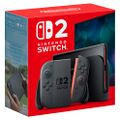 Packaging for the Nintendo Switch 2.
-
 European packaging for the Nintendo Switch 2 + Mario Kart World bundle.
-
 European packaging for the Nintendo Switch 2 + Pokémon Legends: Z-A bundle.
-
 European packaging for the Nintendo Switch 2 + Pokémon Pokopia bundle.
-
 European packaging for the Nintendo Switch 2 + Nintendo Switch Sports Resort bundle.
-
 European packaging for The Legend of Zelda 40th Anniversary Edition bundle.
References
- ↑ 1.0 1.1 Nintendo Switch 2 Tech Specs - Nintendo US. Nintendo. Retrieved August 7, 2025.
- ↑ Nintendo Switch 2 Leveled Up With NVIDIA AI-Powered DLSS and 4K Gaming | NVIDIA Blog. Nvidia. (April 3, 2025). Retrieved August 7, 2025.
- ↑ [1] on Nintendo's website. Retrieved April 4, 2025.
- ↑ [2] InsightGirl UK, Retrieved April 3, 2024
- ↑ [3] ft.com, Retrieved April 4, 2024
- ↑ 6.0 6.1 Differences Between Nintendo Switch 2 and Nintendo Switch Consoles and Accessories. Nintendo Support. Retrieved 12 May, 2026.
- ↑ 7.0 7.1 7.2 7.3 Nintendo Switch 2 Accessories. Nintendo of America. Retrieved 12 May, 2026.
- ↑ New Joy Con 2 Colors Will Launch Alongside Mario Tennis Fever Next Month. Game Informer. (January 8, 2026). Retrieved May 12, 2026.
- ↑ Nintendo UK. Nintendo Direct - 09/06/2026. YouTube. Published on June 9, 2026. Retrieved September 14, 2026.
- ↑ 10.00 10.01 10.02 10.03 10.04 10.05 10.06 10.07 10.08 10.09 10.10 Luckless Heaven. Nintendo Switch 2 Hardware. Luckless Heaven. Retrieved July 14, 2026.
- ↑ How to Attach/Detach and Wear the Joy-Con 2 Strap with Nintendo Switch 2. Nintendo UK. Retrieved 12 May, 2026.
- ↑ Nintendo Switch 2 Accessories. Nintendo UK. Retrieved 12 May, 2026.
- ↑ Nintendo Switch 2 Dock Set (UK). My Nintendo Store. Retrieved July 14, 2026.
- ↑ How To Charge the Nintendo Switch 2 Console. Nintendo AU. Retrieved July 14, 2026.
- ↑ Nintendo Support. Differences Between Nintendo Switch 2 and Nintendo Switch Consoles and Accessories. Nintendo of America. Retrieved July 14, 2026.
- ↑ Nintendo Support. Nintendo Switch 2 Dock Diagram. Nintendo of America. Retrieved July 14, 2026.
- ↑ How to Scan amiibo on Nintendo Switch 2. Nintendo UK. Retrieved 12 May, 2026.
- ↑ 18.0 18.1 18.2 18.3 18.4 18.5 18.6 System Update History for Nintendo Switch 2. Nintendo US. Retrieved 15 June, 2026.
- ↑ 19.0 19.1 19.2 19.3 19.4 19.5 19.6 19.7 System Update History for Nintendo Switch 2. Nintendo UK. Retrieved 15 June, 2026.
 | ||||||||
|---|---|---|---|---|---|---|---|---|
|